發表文章

資料驗證data validation, 資料表Table, 查詢編輯器Query Editor

圖片
資料驗證Data Validation 得以建立一個下拉式選單,作為輸入資料之用。 建立資料表 新加入列或欄會自動擴增表格範圍 樞紐分析表 拖拉樞紐分析表欄位至「以下欄位」 劉任昌的教學說明影片

劉任昌期末考

圖片
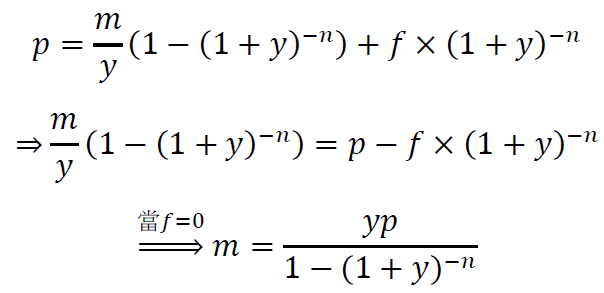
馬哥2021年1月期末考 現值 利率 期數 金流 終值 對照EXCEL先打開從範圍定義名稱 對照EXCEL金融計算 程式碼 <style> h1{border: 25px outset gray;     background-color: purple;     color: white;   text-align: center;} </style> <h1>馬哥2021年1月期末考</h1> <!--輸出現值計算結果到 td--><table border="1"> <tbody> <tr><td>現值</td><td><input id="p" type="number" /></td><td><input onclick="CompP()" type="button" value="計算現值" /></td><td id="p_" width="160"></td></tr> <tr><td>利率</td><td><input id="y" type="number" value="0.001" /></td><td><input onclick="CompY()" type="button" value="計算利率" /></td><td id="y_"></td></tr> <tr><td>期數</td><td><input id="n" type="number"...

劉任昌20201229期末考準備

劉任昌2021年1月期末考 現值 利率 期數 金流 終值

第16週WORD貼到網頁+嵌入臉書到網頁

嵌入劉任昌推薦的臉書影片 投入、陶醉與個性,她壓倒其他所有的舞者。 由 Robert Liu 發佈於  2020年12月18日 星期五 嵌入維基百科提到劉任昌 維基百科金融研訓院 胡詠捷

第十五週HTML+CSS+JavaScript+WORD方程式編輯器

圖片
利率y(rate) 期數n(nper) 金流m(pmt) 終值f(fv) 參考劉任昌 金融市場講義 劉任昌學習HTML+CSS+JavaScript程式碼 <style> h1{border: 20px outset yellow;     background-color: green;     color: white;   text-align: center;} </style> <script> function computePV(){   var r = document.getElementById("rate").value;   var n = document.getElementById("nper").value;   var m = document.getElementById("pmt").value;   var f = document.getElementById("fv").value;   pvif =r;   pvif++;   pvif =1/pvif**n;   var pv = (1-pvif)*m/r + f * pvif;   document.getElementById("pv").innerHTML = pv; } </script> <body> <table border="1"> <tr><td>利率y(rate)</td><td>期數n(nper)</td><td>金流m(pmt)</td><td>終值f(fv)</td></tr>    <td><input id="rate" type="number"/></td>    <td><input id="nper" type="number" />...

說明拷貝命令 錄製巨集 停止錄製

圖片
WORD VBA 左 vs EXCEL VBA右 劉任昌學習的程式碼 Dim n As Integer Dim spec As String Const period As Integer = 4 Const maxerror As Double = 0.0000001 Dim payment(period) As Double '廣域變數 4 維度的陣列 Private Sub CommandButton1_Click()   Dim a, b, c, f, gap As Double   Dim loopNumber As Integer   n = n + 1 '第幾次計算+1   a = 0     '報酬率0   b = 1     '報酬率1   gap = 10   loopNumber = 10   payment(0) = TextBox1.Value   payment(1) = TextBox2.Value   payment(2) = TextBox3.Value   payment(3) = TextBox4.Value   f = npv(a)   If f = 0 Then      Label9.Caption = 0   ElseIf f < 0 Then      Label9.Caption = "內部報酬率小於 0."   Else      Do While gap > mexerror And Abs(f) > maxerror And loopNumber < 100        loopNumber = loopNumber + 1        c = (a + b) / 2        f = npv(c)        If...

第14週WORD VBApplication 與 EXCEL VBApplication

圖片
停止 劉任昌向劉任昌學的程式碼 Dim n As Integer Dim spec As String Const period As Integer = 4 Const maxerror As Double = 0.0000001 Dim payment(period) As Double '廣域變數 4 維度的陣列 Private Sub CommandButton1_Click()   Dim a, b, c, f, gap As Double   Dim loopNumber As Integer   n = n + 1 '第幾次計算+1   a = 0     '報酬率0   b = 1     '報酬率1   gap = 10   loopNumber = 10   payment(0) = TextBox1.Value   payment(1) = TextBox2.Value   payment(2) = TextBox3.Value   payment(3) = TextBox4.Value   f = npv(a)   If f = 0 Then      Label9.Caption = 0   ElseIf f < 0 Then      Label9.Caption = "內部報酬率小於 0."   Else      Do While gap > mexerror And Abs(f) > maxerror And loopNumber < 100        loopNumber = loopNumber + 1        c = (a + b) / 2        f = npv(c)        If Abs(f) > maxerror ...